¶ Adding and configuring a footer in Sitejet Builder
The footer is the last thing a visitor sees on every page — and for UK small businesses it doubles as a legal, practical and trust-building asset. This guide covers adding a footer from Sitejet’s layout library, populating it with content, and what a UK SME should put there (some of it required by law).
¶ Adding a footer
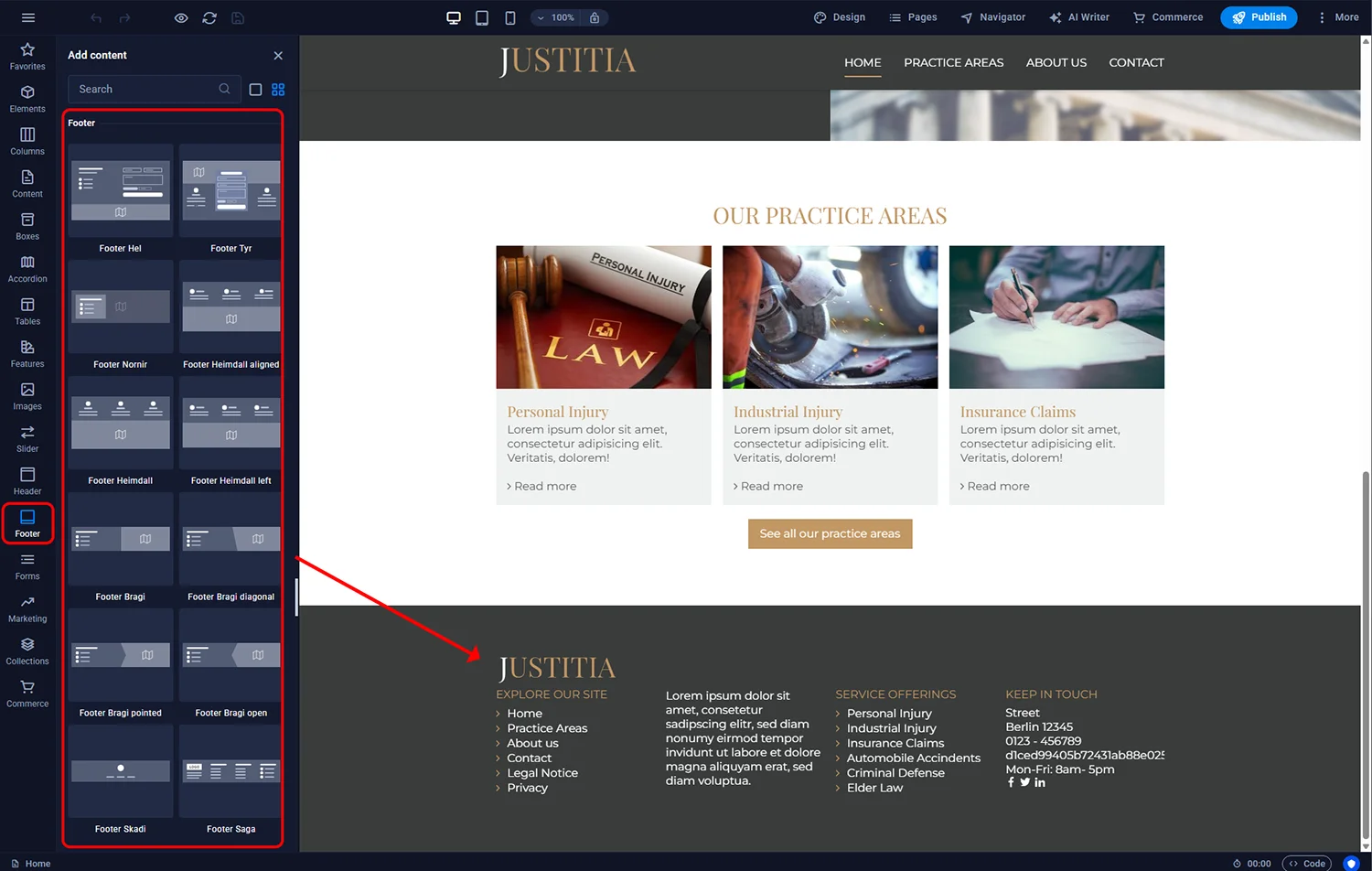
- Open the page in the Sitejet editor and scroll to the bottom.
- In the left sidebar, click the Footer icon.
- Browse the footer layouts — single-row centred, multi-column with navigation, contact-focused, and so on.
- Drag the layout that fits your content to the very bottom of the page.
¶ Configuring the layout
Double-click the footer container (yellow frame) to open settings:
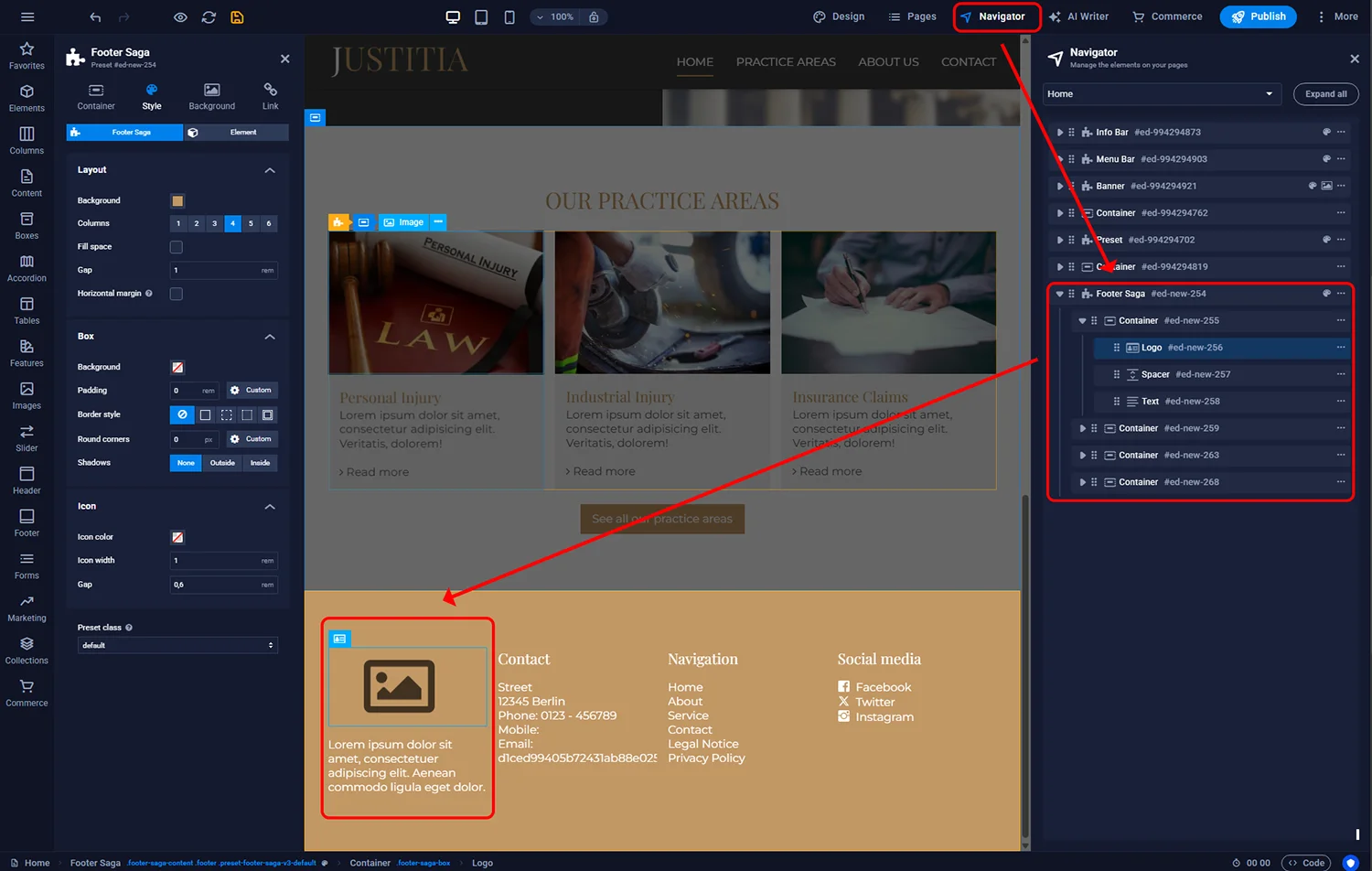
- Background — solid colour, gradient or image. Darker footers are conventional but a light footer can work for minimalist brands.
- Margins — spacing above and below
- Columns — how many content columns the footer has (typically 2–4)
- Column proportions — whether columns are equal width or weighted (for example a wider contact column with a narrower links column)
¶ Populating the content
Footers are built from basic elements: text blocks, headings, lists of links, icons and images. Double-click any element to edit it; use the Navigator panel (top toolbar) to see the structure hierarchically — especially helpful with multi-column footers where nested elements can be hard to click directly.
¶ What a UK business footer should contain
The footer is prime real estate for information that visitors need “eventually” but not upfront. A conventional UK SME footer includes:
¶ Required by UK law (for limited companies)
- Company name as registered at Companies House — e.g. “Manchester Marketing Ltd”
- Company registration number
- Registered office address
- VAT number (if VAT-registered)
- Country of registration (England and Wales, Scotland or Northern Ireland)
¶ Strongly recommended
- Link to Privacy Policy — legal requirement under UK GDPR if you collect any personal data (including a contact form)
- Link to Terms & Conditions
- Link to Cookie Policy / cookie controls
- Accessibility statement link (required for public-sector sites under PSBAR 2018; recommended for all)
¶ Useful but optional
- Contact details — phone, email, address
- Opening hours (if relevant)
- Sitemap-style navigation repeating key pages
- Social media icons with links
- Newsletter sign-up form
- Trust indicators — Trustpilot widget, Checkatrade badge, membership logos (Federation of Small Businesses, Chambers of Commerce), certifications
- Copyright line —
© {Year} Company Name. All rights reserved.
¶ Footer consistency across pages
By default a footer added to one page may not appear on others. Sitejet’s recommended practice: design the footer once, then copy it (right-click → Copy) and paste onto each page. For larger sites, or whenever you edit the footer, re-sync by pasting the updated version across pages. Some Sitejet templates use a reusable footer component — check the template documentation if you are unsure.
¶ Mobile layout
Multi-column footers collapse to a single stacked column on narrow screens. Verify via the phone icon preview that:
- Text remains legible at mobile size
- Tap targets (social icons, links) have enough spacing to avoid mis-taps
- Legal info is still readable without horizontal scrolling
¶ FAQ
Does my website need a privacy policy?
If it collects any personal data (contact forms, analytics, cookies, newsletter sign-up), yes — UK GDPR requires a privacy notice accessible from every page. The footer is the standard placement.
What if my business does not have a registered office?
Sole traders and partnerships trading from home can use their home address or a virtual office service. Ltd companies must use their Companies House registered office.
How small can footer text be?
Keep body footer text at 14 px minimum (preferably 16 px). Legal text in the fine print can go down to 12 px but no smaller — below that it fails WCAG accessibility guidelines and frustrates older visitors.
Should I link to social media in the footer?
Only if you actively use those accounts. Linking to a Twitter/X handle that has not been updated in two years damages trust more than having no link at all.
Can I add a live chat widget in the footer?
Most chat widgets (Tawk, Intercom, LiveChat) render themselves as a fixed floating button and do not live inside the footer. You add them via embedded script in the site settings, not as a footer element.
Do I need a cookie banner as well as a cookie policy?
Yes, if you use non-essential cookies (analytics, advertising). The ICO requires explicit consent before non-essential cookies load. The cookie policy page explains what you use; the banner captures consent.